clash使用
# 安装软件
environment.systemPackages = with pkgs; [
    clash
];
启动
https://github.com/Dreamacro/clash/releases
gunzip -d ./clash-linux-armv7-v1.13.0.gz

# 指定配置文件
clash -f ./config

# 配置文件最重要
# wget https://clashnode.com/wp-content/uploads/2022/12/20221231.yaml
# clash -f ./20221231.yaml


# INFO[0000] HTTP proxy listening at: 127.0.0.1:7890
# INFO[0000] SOCKS proxy listening at: 127.0.0.1:7891
# INFO[0000] RESTful API listening at: 127.0.0.1:9090

# 初次运行会下载Country.mmdb, 放在 ~/.config/clash/ 网站: https://github.com/Loyalsoldier/geoip
# 手动下载
wget https://cdn.jsdelivr.net/gh/Loyalsoldier/geoip@release/Country.mmdb -N -P ~/.config/clash/
安装web端管理软件yacd
# 使用haishanh/yacd
docker run -itd \
-e YACD_DEFAULT_BACKEND=http://127.0.0.1:9090 \
-p 8077:80 \
--name=yadc \
haishanh/yacd

# 访问实体机的
http://127.0.0.1:8077
# 在代理里面选择即可
firefox使用SwitchyOmega
# 配置 SOCKS proxy listening at: 127.0.0.1:7891
# 访问即可显示命令行日志走代理了
配置部分原文
port: 7890
socks-port: 7891
allow-lan: true
mode: Rule
log-level: info
external-controller: :9090
proxies:
  - {name: 🇯🇵 _US_美国->🇯🇵_JP_日本, server: cf-dx-dns.sharecentre.online, port: 443, type: vmess, uuid: 20e92881-5fb4-4b05-bc77-57929476dc69, alterId: 0, cipher: auto, tls: true, skip-cert-verify: false, network: ws, ws-opts: {path: /shirker, headers: {Host: opc-jp.sharecentre.online}}}
clash作为服务端(知道服务端地址的时候使用,不知道地址的用nps)
# 创建配置文件 server.yaml
mixed-port: 7890
# api
external-controller: 0.0.0.0:9090
allow-lan: true
log-level: debug
authentication:
 - "jcleng:jcleng123"

rules:
  - MATCH,DIRECT
# socks5和http,端口是7890
clash -f ./server.yaml
# INFO[0000] Mixed(http+socks) proxy listening at: [::]:7890
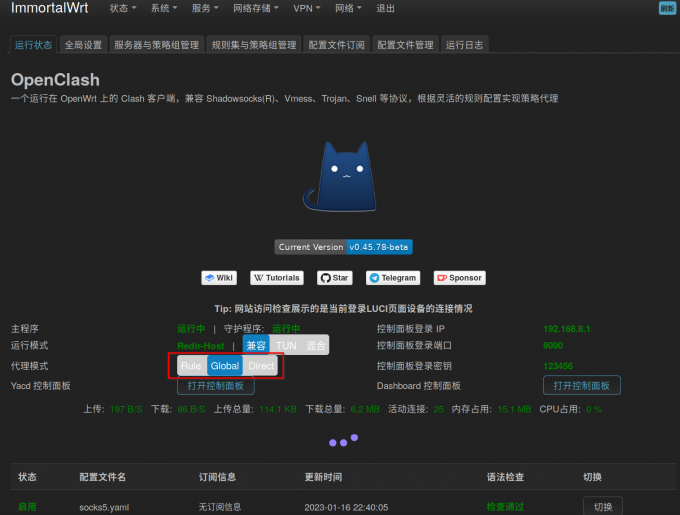
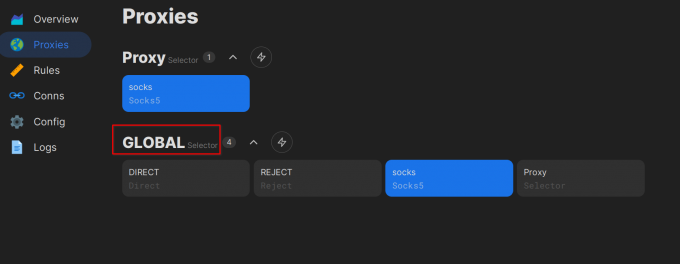
clash使用线上的服务器在在本地开启socks5 配合OpenClash就容易在openwrt里面使用
mixed-port: 7892
# api
external-controller: 0.0.0.0:9090
allow-lan: true
bind-address: '*'
proxies:
  # 连接线上的socks5, 之后就可以本地使用7892端口进行连接了
  - name: "socks"
    type: socks5
    server: 3.0.182.182
    port: 7890
    #server: www.leng2011.icu
    #port: 7892

    username: jcleng
    password: jclengpass
    # tls: true
    # skip-cert-verify: true
    # udp: true
  - name: "csnet"
    type: socks5
    server: www.leng2011.icu
    port: 7892


proxy-groups:
  - name: Proxy
    type: select
    # disable-udp: true
    proxies:
      - socks
      - csnet
# 指定规则进行代理,需要手动修改进行切换socks/csnet
rules:
  - DOMAIN-SUFFIX,google.com,socks
  - DOMAIN-SUFFIX,facebook.com,socks
  - DOMAIN-SUFFIX,github.com,socks
  - DOMAIN-SUFFIX,myip.ipip.net,socks
  - DOMAIN-SUFFIX,+nixos.org,socks
  - MATCH,socks
流量少的话需选择Rule
netch客户端实现游戏加速